Use Claude for personal finance with Brixa
Add Brixa to Claude as a custom connector and ask about your real spending, budgets and goals, from banks in the US, Canada or Europe. No spreadsheets and no code. It only reads, and you can switch it off at any time.
Before you start
- Brixa on your iPhone, with a bank connected. Brixa connects banks through Plaid in the US and Canada and through Enable Banking in Europe. Claude reads from Brixa, never from your bank.
- An active Brixa free trial or subscription. The connector reads your Brixa, so it works while your access is active.
- Claude on any plan. Free, Pro, Max, Team or Enterprise. On the Free plan you can have one custom connector.
- Claude on the web to add it. After that, Brixa is there in Claude on the web, in the desktop app and in the mobile apps.
The address you will paste
https://usebrixa.com/api/mcpAdd Brixa to Claude
- On claude.ai, open Customize, then Connectors.
- Select + Add, then Add custom connector.
- Name it Brixa, paste
https://usebrixa.com/api/mcpas the URL, and select Continue. - For authentication, choose Sign in now.
- For the OAuth client, choose Register automatically, then select Add. Leave Use Claude’s published identity unselected: Brixa’s sign-in does not work with it.
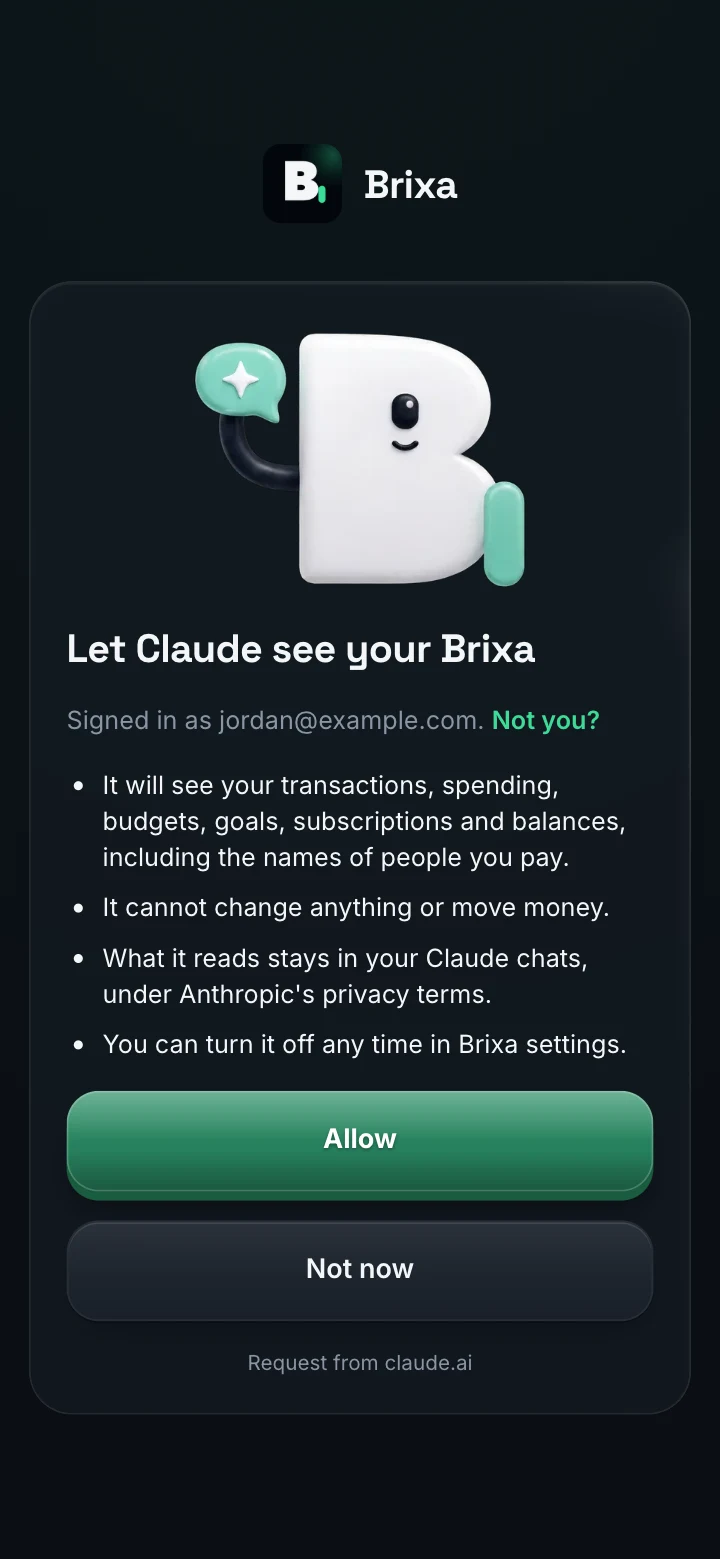
- A usebrixa.com page opens. Sign in with the email or Google account you use for Brixa, read what Claude will be able to see, and select Allow.
- In a chat, select +, then Connectors, and turn Brixa on. Then ask your question.
On a Team or Enterprise plan, an Owner adds the connector first, in Organization settings, Connectors. Each member then connects it for themselves under Customize, Connectors.
Steps checked on October 28, 2026 against Anthropic’s help center. If Claude’s menus look different, search its help center for custom connectors.
Three questions to ask first
“How is this month going compared with last month?”
Spending so far against the same days of last month, so a month that is half over is never compared with a whole one.
“What subscriptions do I pay for, and did any go up?”
Every active recurring charge, its cost per month, the next expected date, and any price rise.
“Am I on track for my savings goal?”
What is saved, what is left, and what each month needs to reach it by the date you set in Brixa.
No spreadsheets or code needed
Many guides to using Claude for personal finance start with exporting CSV files from your bank, or with a script in Claude Code that reads them. That can work, but an export is out of date the next day, every bank formats it differently, and keeping the categories clean is left to you.
With Brixa connected, Claude reads accounts that update on their own and transactions that are already categorized, with the corrections you made in the app. The totals come from Brixa rather than from a formula you wrote, and nothing needs to run on your computer.
Is it safe to connect Claude to your finances?
- Read-only, by design. Claude can read your Brixa. It cannot change a budget, a category or anything else, and nothing in Brixa can move money.
- You sign in on Brixa’s page. Claude never sees your Brixa password or your bank login. It receives a key that only allows reading, and only after you choose Allow.
- You know what it sees. Transactions, spending, budgets, goals, subscriptions and balances, including the names of people you pay. If you exclude an account in Brixa, Claude does not see it either.
- Your chats are Claude’s. What Claude reads becomes part of that conversation, under Anthropic’s privacy terms. Delete a conversation in Claude if you would rather not keep it.
- Figures you can check. Brixa works out every total and tells Claude which days and accounts it covers. A projection is a what-if from your own history, never a promise.
- Revocable at once. Disconnect in Brixa and Claude can no longer read anything.
More on this in how to give AI access to your finances safely.
Claude or ChatGPT?
You do not have to choose. Brixa works in both with the same read-only access and the same numbers, so use the assistant you already like, or connect both. Each one shows up separately in Brixa under Settings, Connected AI, and disconnecting one leaves the other as it is. The steps for ChatGPT are in the ChatGPT guide.
If something does not work
- You are on Claude’s Free plan and already have a custom connector. Free plans can have one. Remove the other under Customize, Connectors, or move to a paid Claude plan.
- Claude answers without Brixa. In the chat, select +, then Connectors, and check that Brixa is turned on.
- The page says Brixa Pro is needed. Your Brixa free trial or subscription is not active. Start or renew it in the Brixa app, then connect again from Claude.
- The page says That took a while. For your security, the sign-in expires after 10 minutes. Go back to Claude and connect again.
- The numbers look out of date. Answers say when each bank last synced. If a bank needs reconnecting, reconnect it in the Brixa app.
How to disconnect
- In Brixa. Sign in at usebrixa.com/app/settings, open Connected AI, and choose Disconnect next to Claude. Access stops at once.
- In Claude. You can also remove Brixa under Customize, Connectors. Disconnecting in Brixa is what cuts off access, so do that too.
Questions people ask
With Brixa, Claude gets read-only access after you sign in on usebrixa.com and allow it. Claude never sees your bank login or your Brixa password, cannot change anything or move money, and loses access as soon as you disconnect.
Yes. Claude’s Free plan allows one custom connector, so Brixa can be that one. Brixa itself needs an active free trial or subscription.
Yes. Custom connectors work in Claude on the web, in the desktop app and in the mobile apps, so once Brixa is added you can ask from your phone too.
For questions about your own money, what matters most is what the assistant can read. With Brixa, both read the same categorized numbers, read-only, so use the one you prefer, or connect both (here is the ChatGPT guide).
No. Brixa keeps your accounts synced and categorized, and Claude reads them through the connector. There is nothing to export, install or keep running.
No. The connector is read-only: Claude can read your Brixa but cannot change anything in it, and nothing in Brixa can move money.
Get Brixa, then ask Claude
Brixa is an iPhone app. Connect your banks in it first, then add it to Claude with the steps above. Free to try.